
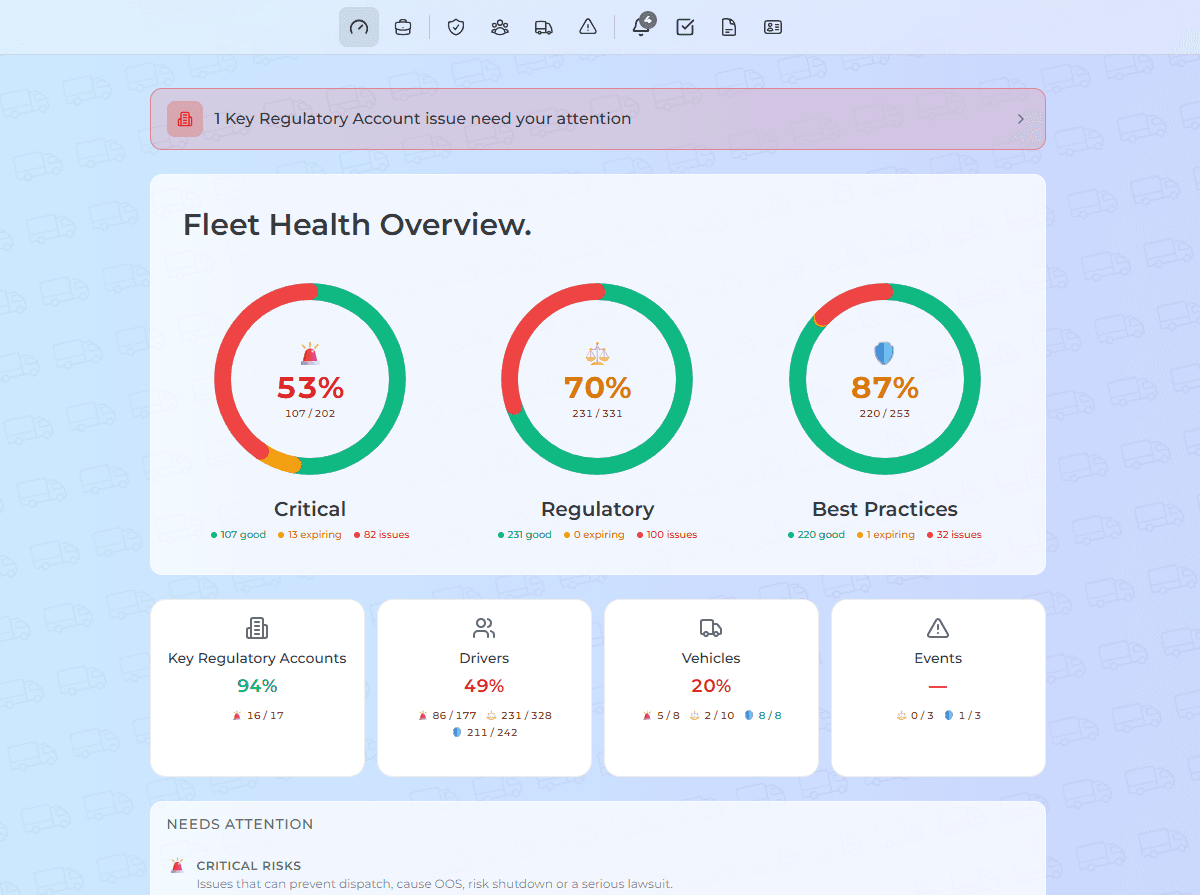
Compliance that flies with you.
Every driver qualified. Every file audit-ready. Every mile.
Protect your drivers.
And your contracts.
FleetFalcon runs the repetitive 90% of DOT compliance on autopilot, so your safety team gets back to coaching drivers — before a missed file turns into a lawsuit or a lost broker contract.
- Live in days
- No rip-and-replace
- Cancel anytime
2,000+
drivers onboarded
& audit-ready
One record, not five logins
Your compliance is scattered across systems that were never built to talk.
Hours in your ELD. Training in another login. Driver files in a binder. FleetFalcon integrates with the tools you already run and pulls them into one audit-ready record — no rip-and-replace.
Integrates with


ELD telematics (Motive, Samsara, Geotab) and training (CarriersEdge, Luma) — and it sits alongside your TMS.
Compliance shouldn't feel like this
The external problem
Documents expire, roadside inspections pile up on paper, onboarding drags across 11 signatures, and tickets slip through the cracks.
The internal problem
You're always one missed renewal away from an out-of-service order — and you feel that weight every time a truck rolls out.
The deeper problem
You got into trucking to move freight and keep drivers safe — not to babysit spreadsheets and dread the next audit.
Miss one file and it's not just a fine — it's an out-of-service violation, a CSA score that scares off brokers, and a lawsuit you can't defend.
90%
We run the boring part.
Tracking, renewals, inspections, onboarding, incidents and citations — the repetitive work that eats your week runs itself.
10%
You make the calls.
Which violation to fight. When to pull a unit. The safety decisions that actually matter — with the time back to make them well.
Safety teams on FleetFalcon
“We’ve been able to save hours for our team, and focus on what truly matters — drivers instead of paperwork.”
One platform for the whole compliance stack
DocPulse
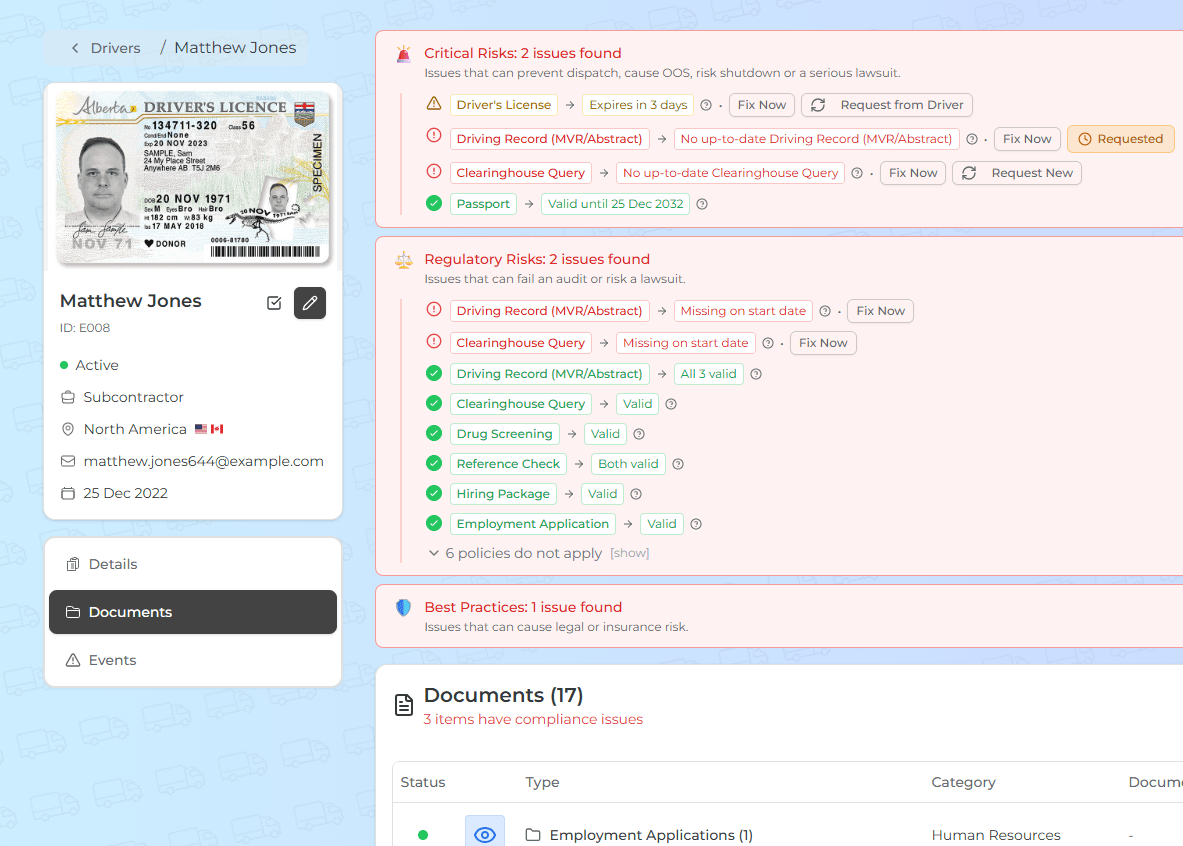
One system tracks, renews, requests and verifies thousands of driver and fleet documents — no bloated compliance team, no wild spreadsheets.
Track & renew automatically
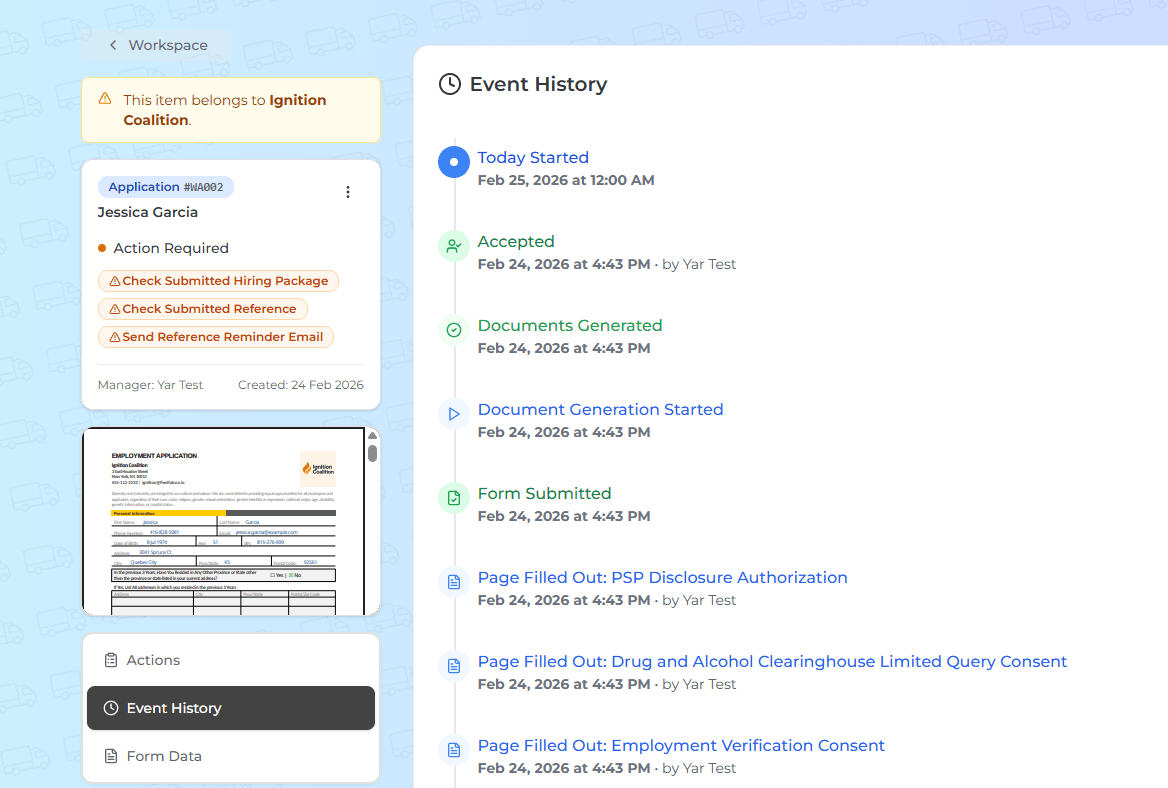
Rapid Onboarding
Onboarding a driver takes 11 signatures. FleetFalcon replaces that with one link and three clicks — a full, verified, audit-ready package in minutes instead of days.
One link, three clicks
Violation Radar
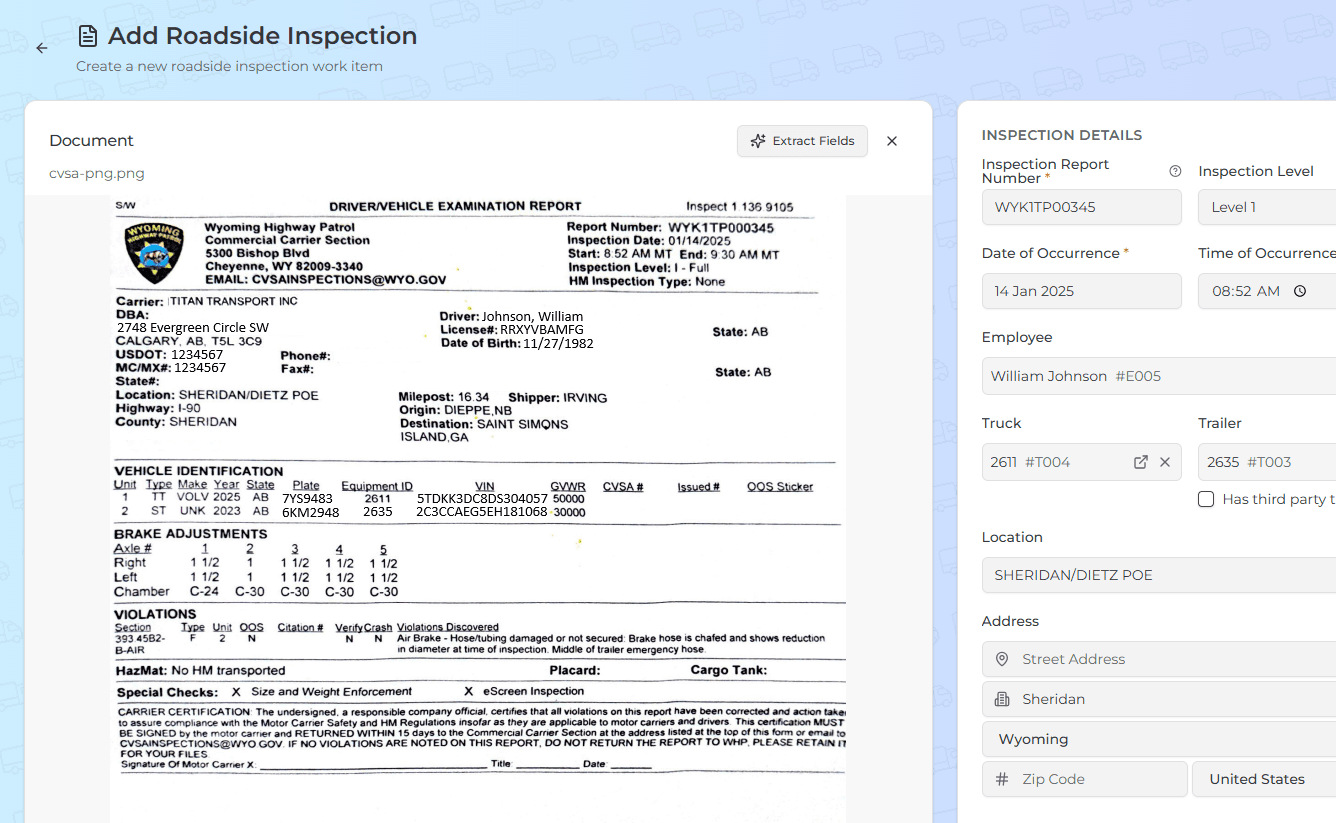
Roadside inspections flow in automatically — Violation Radar pulls every inspection result straight into your Events section, ties each violation to the right driver or unit, and flags OOS before it drags your CSA. Still get a paper CVSA report? Snap a photo and AI scans that too. Available inside your plan — or as a standalone product.
Inspections sync automatically
Everything else, in one place
Incident Control
Incidents happen. FleetFalcon streamlines evidence, witness and driver statements, and paperwork — everything logged and ready for insurance claims and audits.
Citation Watch
Fleets get a lot of tickets. FleetFalcon turns every one into a clear pay-or-fight pipeline — protecting your CSA scores and insurance premiums.
Driver Qualifications
Complete, §391-compliant DQ files for CDL and non-CDL drivers — each requirement mapped to the regulation behind it.
Carrier Profile
Your FMCSA registration profile — MCS-150, authority, UCR and more — kept current for US and Canadian carriers.
English Testing
Run and record English Language Proficiency (ELP) checks against the reinstated FMCSA requirement, right on the driver profile.
Up and running in three steps
From spreadsheets to a fleet that runs itself — no rip-and-replace, live in days.
01
Start your free month
Create your account in minutes — no rip-and-replace, no IT project.
02
We build your fleet's profile
Import drivers and vehicles; FleetFalcon maps every requirement by jurisdiction and asset type. Live in days.
03
It runs the 90%
Tracking, renewals, inspections, incidents and citations run themselves. You make the 10% of calls that matter.
See what a green score is hiding
Enter your USDOT or MC number — we'll surface the dangerous violations a clean BASIC score can mask. No account needed.
Free · live FMCSA data · no account
Flat monthly. No per-driver math.
Pick the tier that fits your truck count. Every self-serve plan starts with a free month.
Starter
1–10 trucks
1 month free, then $99/mo
Owner-operators & small fleets.
Start your free monthProfessional
26–50 trucks
1 month free, then $449/mo
Established mid-size fleets.
Start your free monthEvery plan includes everything.
No feature gates. You pick the tier by how many trucks you run — not by which tools you need.
- DocPulse — document & credential expiry tracking
- Driver Qualification (DQ) files — §391
- Rapid Onboarding — one-link driver forms
- Violation Radar — roadside-inspection parsing
- Citation Watch — pay-or-fight pipeline
- Incident Control — evidence & statements
- Carrier Profile — FMCSA registration
- CSA / safety-score monitoring
- Email & SMS expiry reminders
- Multi-user roles & permissions
- Reporting & data exports
English Testing (ELP) — a standalone product
Run and record FMCSA English Language Proficiency checks on any driver — pay only for the tests you run. No subscription required; use it on its own or alongside any plan.
Become the fleet that's never caught off guard
Let the software handle the paperwork. You keep the fleet safe, audit-ready, and moving.
Frequently asked questions
What is FleetFalcon?
FleetFalcon is a fleet safety and DOT compliance platform for trucking carriers. It automates the repetitive work of FMCSA compliance — driver qualification files, document tracking, roadside inspections, citations, incidents, onboarding, and CSA safety monitoring — so your team stays audit-ready without spreadsheets or manual reminders.
What compliance does FleetFalcon handle?
Driver qualification (DQ) files, drug & alcohol testing and FMCSA Clearinghouse queries, vehicle registration and inspections, company registrations (MCS-150, BOC-3, UCR, IFTA, IRP, operating authority), roadside inspections and citations, incident response, and CSA / FMCSA safety monitoring.
Who is FleetFalcon for?
US and Canadian trucking carriers, fleets, owner-operators, and DOT-regulated motor carriers — plus safety and compliance managers, and management organizations or consortiums that manage multiple carriers.
Does FleetFalcon work for non-CDL drivers?
Yes. FleetFalcon builds a complete driver qualification file for both CDL and non-CDL drivers, and automatically scopes CDL-only requirements — like FMCSA Clearinghouse queries and Part 382 drug and alcohol testing — so non-CDL drivers aren't flagged for rules that don't apply to them.
Can FleetFalcon monitor my CSA scores?
Yes. FleetFalcon benchmarks your FMCSA BASIC standing against peer carriers of similar fleet size and region using FMCSA's open inspection data, and tracks out-of-service rates, crash and inspection trends, and recent roadside inspections.
Does FleetFalcon work in Canada and for cross-border fleets?
Yes. FleetFalcon supports both US and Canadian carriers and cross-border operations, including Canadian carrier profiles, provincial requirements, and US/Canada document rules.
How is FleetFalcon different from spreadsheets or a shared document folder?
FleetFalcon actively tracks what's missing or expiring, requests documents from drivers by text or email, uses AI to read and file uploaded documents, and maps every requirement to the underlying regulation — so nothing slips and you keep an audit-defensible record.
How does driver onboarding work?
Replace about eleven separate onboarding documents with a single link. The driver completes it in a few clicks, FleetFalcon assembles the full package, verifies each document, and keeps everything audit-ready — minutes instead of days.