Fleet ComplianceSolved

Let software check documents, process inspections, onboard drivers, handle incidents and citations.

  • Reduce OOS and violations
  • Spend 10x less time on compliance
  • Lower insurance premiums
  • Stay audit-ready
  • Protect your CSA scores
  • Move cargo instead of chasing paper
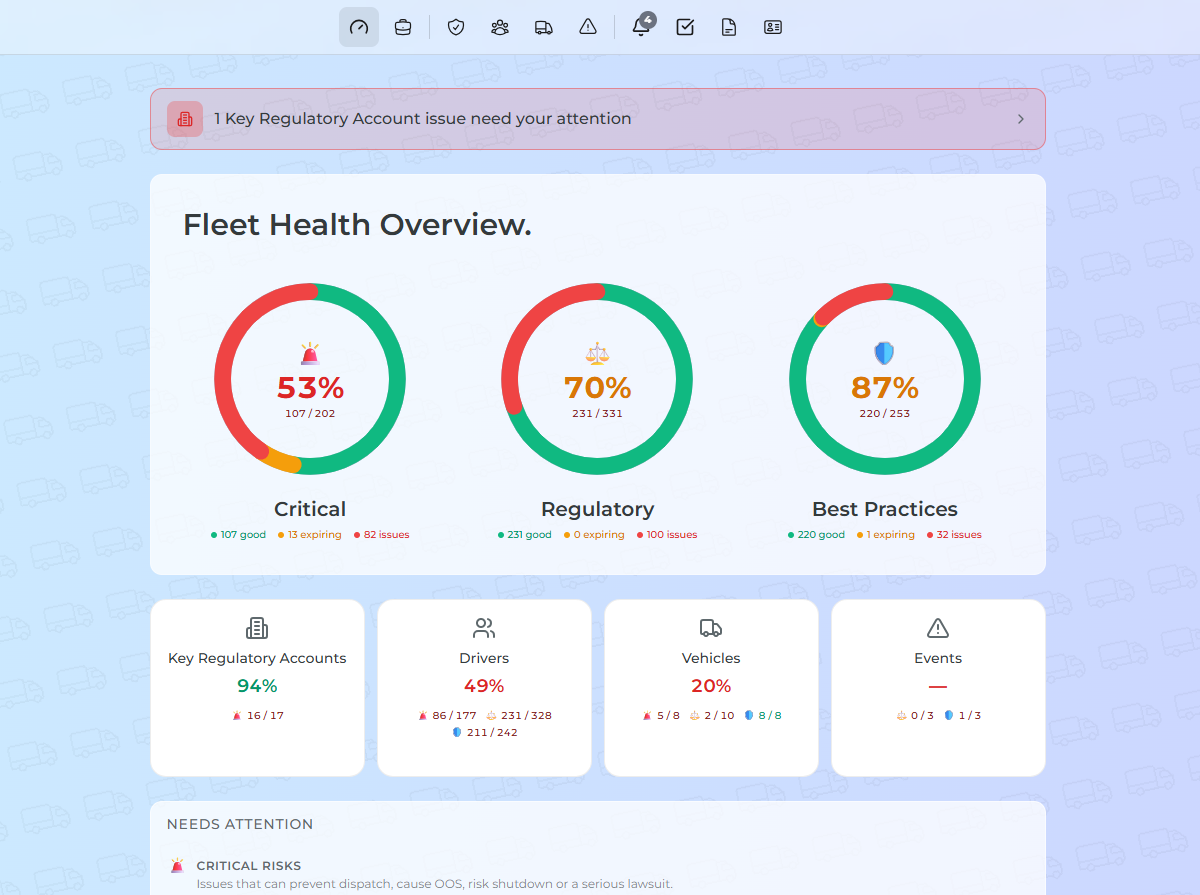
Fleet Falcon dashboardRoadside inspectionDocPulse - driver profileRapid OnboardingIncident ControlCitation Watch

A typical day of a

Fleet Compliance Department

looks like this

90%

Boring, repetitive, error-prone tasks

  • Capture and log every driver citation (photo or manual entry)
  • Request incident statements from witnesses via email or SMS
  • Schedule repairs for CVSA roadside inspection violations
  • Track driver training records, passports, visas, work permits
  • Review and classify every uploaded fleet document so nothing is mislabeled
  • Log citation court dates, lawyer contacts, corrective actions, amount paid
  • Make sure each driver's compliance docs are not expiring
  • Collect witness contacts and capture photos immediately after incident
  • Mark vehicle out-of-service (OOS) after inspection and alert manager
  • Track truck and trailer maintenance records
  • Collect driver abstract consent and training certificates
  • Build safety incident packet for manager review
  • Submit proof of repair to DOT or government agencies when required
  • Chase drivers for new DLs, MVRs, and passports
  • Tie every document to the right driver, truck, or trailer
  • Sync inspection sources to catch unreported roadside inspections
  • Keep spreadsheets, email folders, and shared drives for fleet compliance docs
  • Schedule and track repairs for CVSA inspection violations
  • Assign compliance tasks and remind responsible person to complete them
  • Upload confirmation when compliance task is completed
  • Store, send, and validate driver onboarding documents
  • Remind staff to complete violation repairs and collect proof of repair
  • Track driver licenses, medical certificates, MVRs, work authorization
  • Pull Drug & Alcohol Clearinghouse report for each driver
  • Parse violation, jurisdiction, deadlines, and fine amounts from driver tickets
  • Schedule road tests for new drivers
  • Detect and chase missing or unreported roadside inspections
  • Track driver and vehicle doc expirations with calendar reminders
  • Manually enter violations from paper inspections (driver, truck, trailer)
  • Verify every driver/fleet document and field meets DOT regulatory standards
  • Collect driver certs, Clearinghouse consent, PSP consent
  • Approve and log corrective actions (training, coaching, discipline) for incidents
  • Store safety incident witness statements
  • Manually track which compliance documents are required by jurisdiction and asset type
  • Track CSA/BASIC and CVOR-style carrier safety profiles
  • Generate and send inspection follow-up emails to agencies and store proof
  • Make sure border-crossing drivers have passports and visas
  • Track incident witness responses and chase follow-ups
  • Link CSA/CVOR score changes to violations and prepare for reviews
  • Collect CVSA roadside inspection (photo or paper) from driver
  • Decide fight or pay for each driver citation
  • Schedule safety or compliance trainings for each driver
  • Collect driver employment application and consent for ref checks
  • Make at least 3 documented attempts when previous employer doesn't respond to driver ref check
  • Chase signatures on 11 different driver onboarding documents
  • Schedule safety or compliance training for drivers
  • Collect driver employment contract, orientation acknowledgement, substance testing consent
  • Chase drivers by text, calls, or emails when a compliance doc expires
  • Pull PSP (Pre-Employment Screening Program) reports for drivers
  • Run and document driver safety training in external systems
  • Prepare corrective action documents for fleet violations
  • Send reference forms, follow up, record every attempt for DOT compliance
  • Store proof that insurance was notified of incident
  • Assign lawyer and collect court date when fighting a driver citation
  • Collect driver ref check or certification from each previous employer (5 years)
  • Notify insurance of safety incidents and generate or send emails
  • Renew driver or vehicle documents by logging in and manually redoing the process
  • Record driver voice or written statement after safety incident
  • Ensure safety incident isn't closed until all required steps are complete
  • Issue corrective action for inspection violation and log for audit
  • Remind responsible person for every driver citation deadline
  • Reconcile safety events and violations from ELD (Samsara, Motive, Geotab)
  • Track truck and trailer registrations, inspections, insurance, permits
  • Capture and log every driver citation (photo or manual entry)
  • Request incident statements from witnesses via email or SMS
  • Schedule repairs for CVSA roadside inspection violations
  • Track driver training records, passports, visas, work permits
  • Review and classify every uploaded fleet document so nothing is mislabeled
  • Log citation court dates, lawyer contacts, corrective actions, amount paid
  • Make sure each driver's compliance docs are not expiring
  • Collect witness contacts and capture photos immediately after incident
  • Mark vehicle out-of-service (OOS) after inspection and alert manager
  • Track truck and trailer maintenance records
  • Collect driver abstract consent and training certificates
  • Build safety incident packet for manager review
  • Submit proof of repair to DOT or government agencies when required
  • Chase drivers for new DLs, MVRs, and passports
  • Tie every document to the right driver, truck, or trailer
  • Sync inspection sources to catch unreported roadside inspections
  • Keep spreadsheets, email folders, and shared drives for fleet compliance docs
  • Schedule and track repairs for CVSA inspection violations
  • Assign compliance tasks and remind responsible person to complete them
  • Upload confirmation when compliance task is completed
  • Store, send, and validate driver onboarding documents
  • Remind staff to complete violation repairs and collect proof of repair
  • Track driver licenses, medical certificates, MVRs, work authorization
  • Pull Drug & Alcohol Clearinghouse report for each driver
  • Parse violation, jurisdiction, deadlines, and fine amounts from driver tickets
  • Schedule road tests for new drivers
  • Detect and chase missing or unreported roadside inspections
  • Track driver and vehicle doc expirations with calendar reminders
  • Manually enter violations from paper inspections (driver, truck, trailer)
  • Verify every driver/fleet document and field meets DOT regulatory standards
  • Collect driver certs, Clearinghouse consent, PSP consent
  • Approve and log corrective actions (training, coaching, discipline) for incidents
  • Store safety incident witness statements
  • Manually track which compliance documents are required by jurisdiction and asset type
  • Track CSA/BASIC and CVOR-style carrier safety profiles
  • Generate and send inspection follow-up emails to agencies and store proof
  • Make sure border-crossing drivers have passports and visas
  • Track incident witness responses and chase follow-ups
  • Link CSA/CVOR score changes to violations and prepare for reviews
  • Collect CVSA roadside inspection (photo or paper) from driver
  • Decide fight or pay for each driver citation
  • Schedule safety or compliance trainings for each driver
  • Collect driver employment application and consent for ref checks
  • Make at least 3 documented attempts when previous employer doesn't respond to driver ref check
  • Chase signatures on 11 different driver onboarding documents
  • Schedule safety or compliance training for drivers
  • Collect driver employment contract, orientation acknowledgement, substance testing consent
  • Chase drivers by text, calls, or emails when a compliance doc expires
  • Pull PSP (Pre-Employment Screening Program) reports for drivers
  • Run and document driver safety training in external systems
  • Prepare corrective action documents for fleet violations
  • Send reference forms, follow up, record every attempt for DOT compliance
  • Store proof that insurance was notified of incident
  • Assign lawyer and collect court date when fighting a driver citation
  • Collect driver ref check or certification from each previous employer (5 years)
  • Notify insurance of safety incidents and generate or send emails
  • Renew driver or vehicle documents by logging in and manually redoing the process
  • Record driver voice or written statement after safety incident
  • Ensure safety incident isn't closed until all required steps are complete
  • Issue corrective action for inspection violation and log for audit
  • Remind responsible person for every driver citation deadline
  • Reconcile safety events and violations from ELD (Samsara, Motive, Geotab)
  • Track truck and trailer registrations, inspections, insurance, permits

FleetFalcon will do the boring 90%.

So you can focus on the 10% that actually keeps your fleet safe.

10%

Important decisions about fleet safety

(and this is a generous estimate)

Why Fleet Falcon

Less time on docs. Fewer OOS. Better insurance outcomes. Always audit-ready.

Way less time

Software tracks and renews docs for you

Catch critical fails

Expired critical docs or permits can ground a driver

Always audit-ready

Avoid fines and shutdowns

Lower premiums

Insurance companies love organized, compliant fleets

A no-brainer upgrade for your fleet.

Fleet Falcon unified dashboard

Complements your existing systems

Integrates with ELDs, TMS platforms, and existing workflows without replacing tools you already use.

Fast to deploy

Minimal setup required — start identifying compliance risks within days, not months.

No driver training required

Drivers don't even need to make accounts.

Customizable to your fleet

Have specific requirements or conditions? We bet we can make it work.

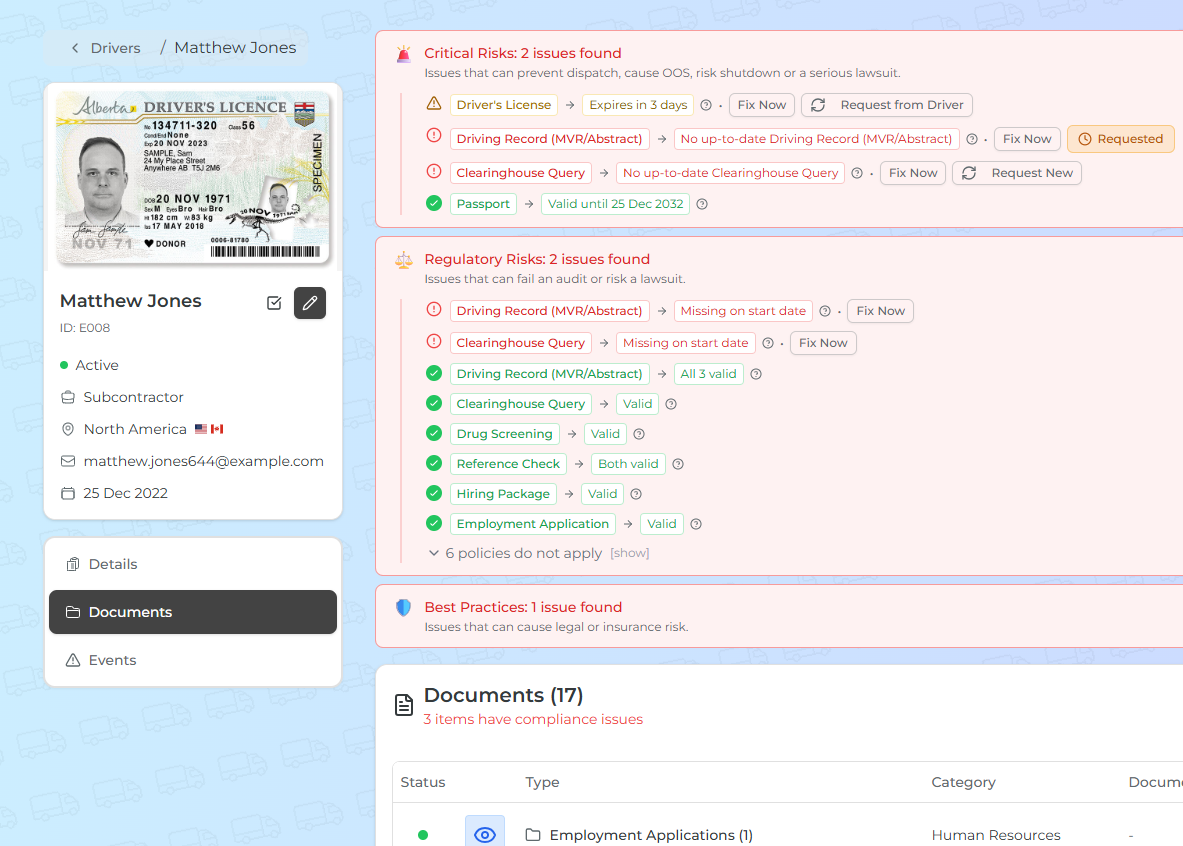
DocPulse

One software that tracks, renews, requests and verifies thousands of driver and fleet documents. No more bloated compliance departments or wild spreadsheets.

Track & renew automatically

Expirations monitored continuously. Drivers get automatic reminders for DLs, MVRs, passports. AI scans every added doc for validity. Where renewal can be automated, FleetFalcon handles it.

Prevent OOS and catch critical fails

FleetFalcon will alert managers when missing/expiring document is likely to cause OOS or threaten authority.

Audit-ready by default

Know what's missing and what's expiring. Compliance gaps caught before they ground a driver or trigger a fine.

DocPulse - driver profile and document tracking
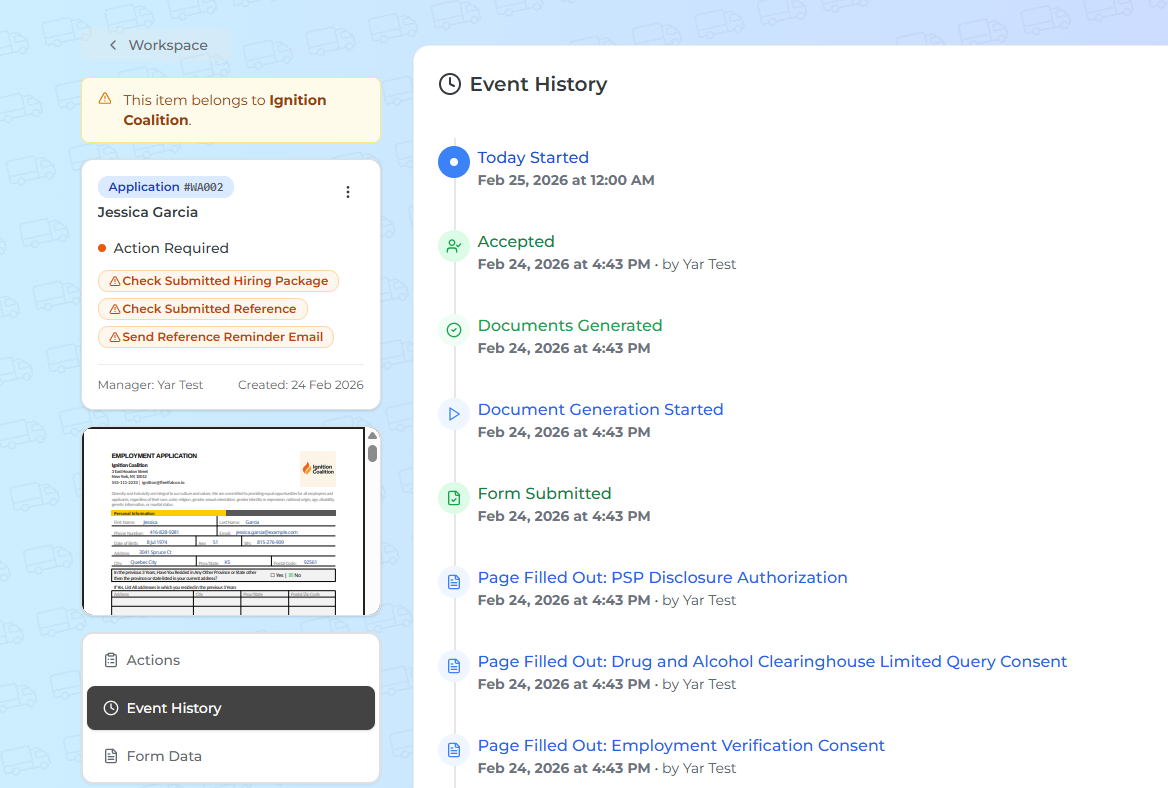
Rapid Onboarding - driver onboarding events

Rapid Onboarding

Onboarding a driver requires 11 different signatures. FleetFalcon replaces that with one link and three clicks — full package, verified and audit-ready in minutes instead of days.

One link, three clicks - full compliance

Mobile-friendly form with all legally required questions; driver completes on his phone. AI validates submitted documents. Digital signatures guarantee every consent is collected.

Automated Reference checks

Reference checks - both manual and automated. Documented outreach attempts for regulatory verification..

Everything in one place

Signed agreement, reference checks, application, licence, abstract — all on driver's profile, time-stamped and traceable for audits.

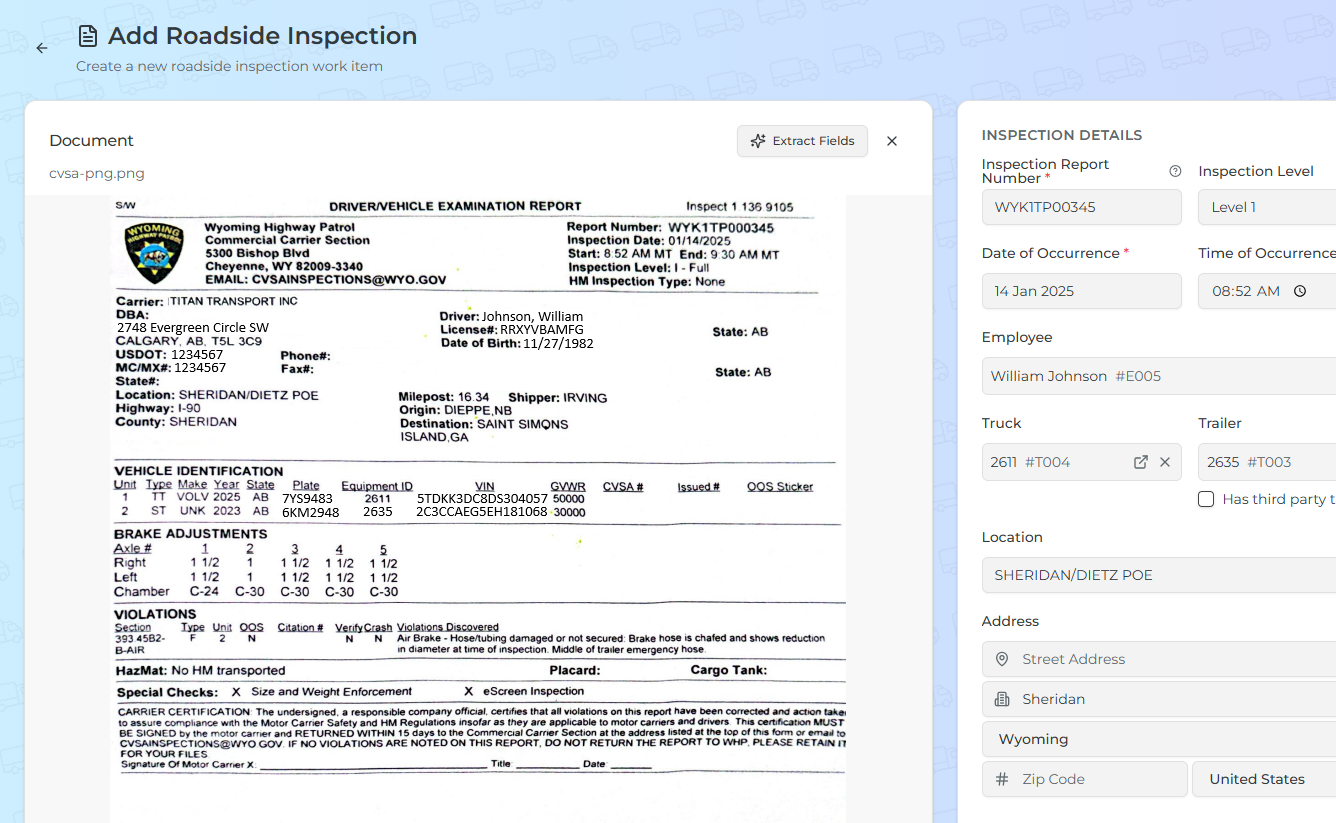
Violation Radar — Roadside Inspections

CVSA inspections are still done on paper. One photo of the doc - and AI scans it, extracts violations, schedules mandatory repairs, drafts corrective actions, flags OOS. Turn opaque inspection process into transparent, audit-ready, insurance-friendly data.

Paper intake, AI-scanned

No lost inspections. Violations are logged and tied to the right asset or driver; mandatory repairs are scheduled and tracked.

Proof of repair & authority notification

If required, FleetFalcon will draft proof of repair communication and submit it to the government for you.

Reduced OOS risk

Violations resolved on time. Inspection history complete and organized so you're always audit-ready.

Violation Radar - roadside inspection
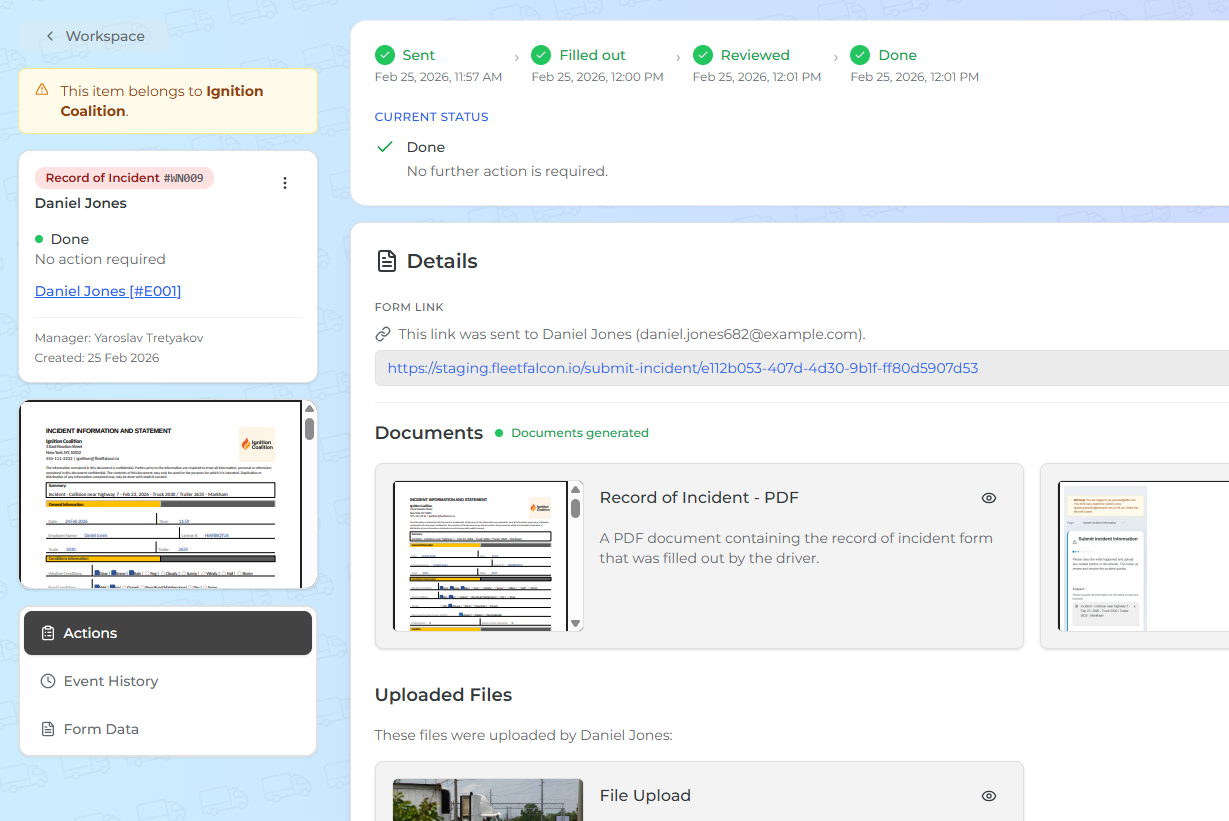
Incident Control - incident work item

Incident Control

Incidents happen. Fleetfalcon will streamline collecting evidence, witness/driver statements, paperwork. Everything is logged and ready for insurance claims and audits.

Standard procedure

Due diligence in indicent handling determines insurace and audit outcomes. FleetFalcon facilitates quick and simple incident handling off the driver's phone.

Evidence collection

Photos, videos, witness and driver statements collected, stored and timestamped for audit purposes.

Clear manager review

AI will create full incident report and draft a corrective action for the driver - minimizing the risk of liability and saving your time.

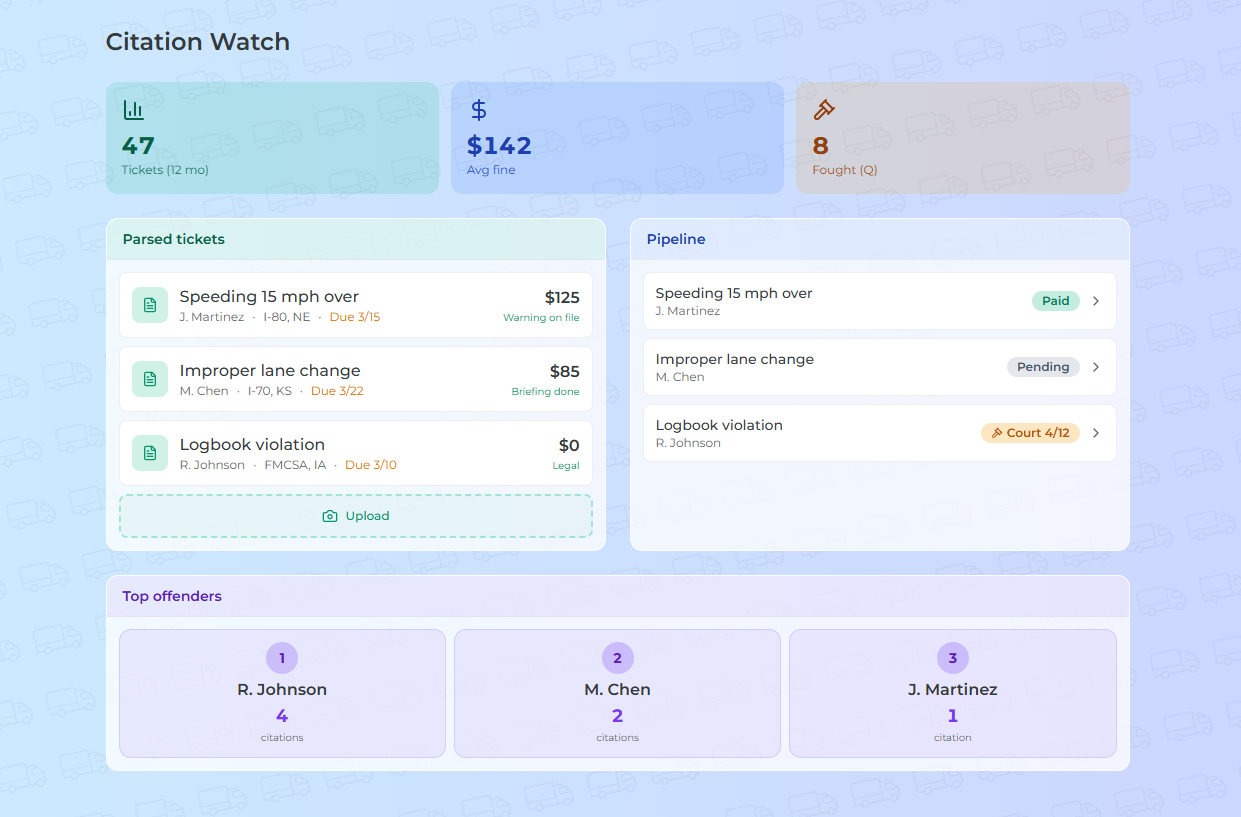
Citation Watch

Fleets get a lot of tickets. FleetFalcon uses AI to automate the process and turn every ticket into a clear pay-or-fight pipeline - reducing CSA scores and insurance premiums.

Capture & parse every ticket

Drivers upload a photo or managers log manually. AI parses violation, jurisdiction, deadlines, and fine amounts. Corrective action drafted for your approval.

Fight or pay — no limbo

One decision per ticket. Fight? Task to assign lawyer and collect court date. Pay? Logged and tracked so nothing resurfaces later.

Trends & statistics

Aggregate score and ticket history across drivers and time. See top offenders, citation frequency, and financial impact — so you can act before patterns become problems.

Citation Watch
Get Started

Nobody likes paperwork

Let computers do it. Focus on shipping cargo and making money.